Move vehicle and plate
Use this flow to move a vehicle to a new organization and/or change plate registration fields.
Assumes: you are signed in with vehicle-edit, and the vehicle is not in a lot with lot_status = in_progress.
1. Open the dialog
From the detail page:
- Open
/assets/vehicle/$vehicleId - Click ⋮
- Choose Move Vehicle
Or from the list: row ⋮ → Move Vehicle
Active lot
If lot_status = in_progress, the menu item is disabled: Cannot move vehicle while in an active lot.
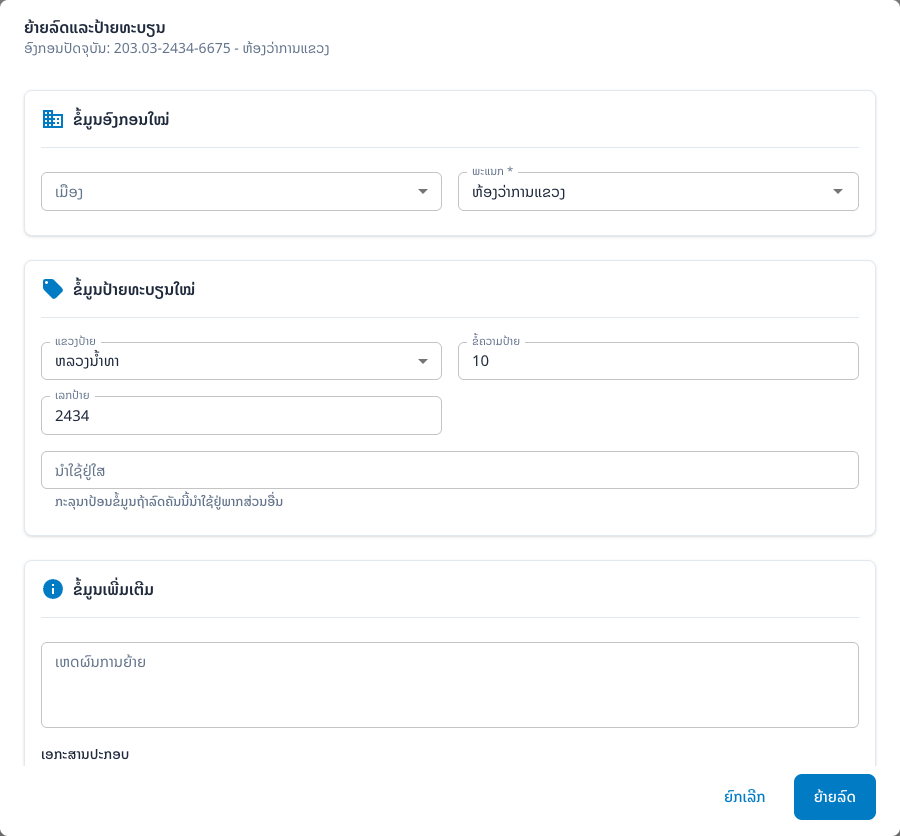
The dialog title is Move Vehicle and Plate Registration, with the current organization (code - ministry).
2. New organization
Update OrganizationalFields:
| Field | Notes |
|---|---|
level | CENTER / PROVINCE / DISTRICT |
ministry_id | ministry |
maindepart_id | main department |
depart_id | department |
province_id / district_id | depending on level |
Defaults are pre-filled from the current vehicle.
3. New plate registration
| Field | Notes |
|---|---|
plate_province_id | selecting a province auto-fills plate_address |
plate_text | max 2 characters |
plate_no | max 4 characters |
used_at | place of use |
4. Additional information
| Field | Notes |
|---|---|
reason | reason for the move (max 500) |
| Supporting document | upload → file_s3_key / file_url |
5. Save
- Click Move Vehicle
- On success the dialog closes and data refreshes
- Re-check plate / organization on the detail page
Common problems
| Symptom | Cause | Fix |
|---|---|---|
| Menu disabled | lot_status = in_progress | Wait for the lot to finish or cancel it |
| Save fails | validation / network | Check required fields and the error toast |